Free iOS app · No account

TickTidy is a gentle cleaning app for one-room resets.

TickTidy helps overwhelmed people tidy one room at a time using simple checklists, short reset timers, and encouraging guidance — no sign-up, no cloud, all on your device.

Two minutes or twenty — there's no wrong way to reset.

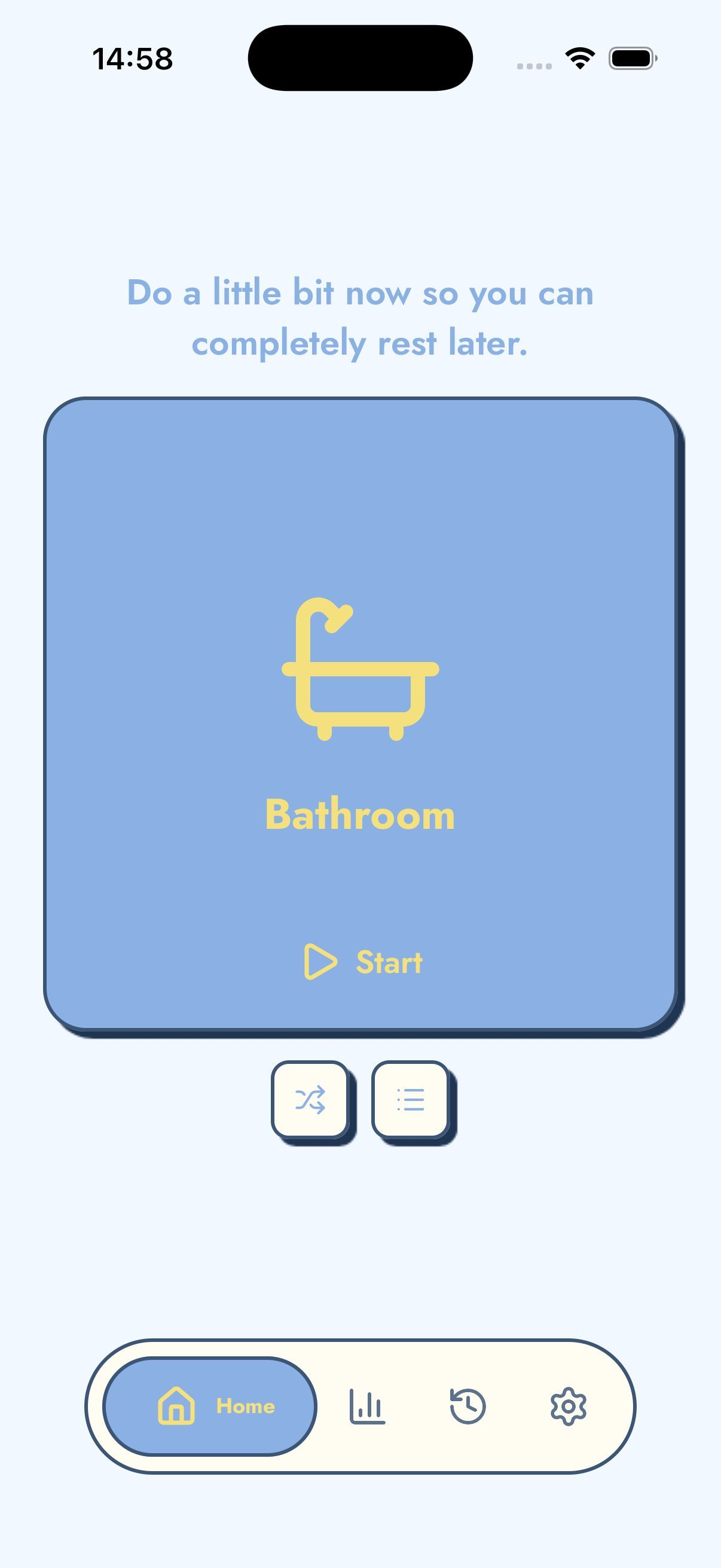
Home screen showing the Bathroom room with a Start button

What is TickTidy?

A gentle cleaning timer for one-room resets

TickTidy is a mobile cleaning app that helps overwhelmed people tidy one room at a time using short reset timers, simple cleaning checklists, and encouraging progress feedback.

The app is for people who want a practical way to start cleaning without building a full chore calendar. It works well for ADHD-friendly cleaning, executive dysfunction, busy parents, students, renters, remote workers, and anyone who prefers gentle motivation over guilt.

TickTidy is different because it is not trying to manage your whole home. It narrows the job to one space, one timer, and one small win, while keeping rooms, checklists, reminders, and history on your device.

Quick facts

Purpose
Help you start a room reset when cleaning feels too big.
Best for
Daily resets, ADHD cleaning, panic cleaning, decluttering, and habit building.
Philosophy
Low shame, local-first, small wins over perfect homes.

Why TickTidy

TickTidy reframes cleaning as one small, kind win instead of an overwhelming chore plan.

No account, fully private

TickTidy does not ask you to sign up before you clean. Rooms, checklists, reminder settings, streaks, and cleaning history are stored on your iPhone, not in a cloud account. That makes the app fast to start and simple to trust: open it, pick a room, and begin a reset without entering an email address or building a household profile. Ads may use the normal App Store and ad network consent controls, but your personal cleaning data stays local.

Low pressure by design

TickTidy is built for people who feel stuck, tired, busy, or overwhelmed. The app avoids overdue lists, guilt, and huge chore plans. A room reset can be useful even if you only collect trash, clear one surface, or put away five items. The goal is not a perfect home. The goal is a visible improvement that helps you start, stop, and come back tomorrow without shame.

One small win at a time

Instead of asking you to organise an entire home, TickTidy focuses on one room, one timer, and one checklist. This makes it useful for ADHD-friendly cleaning, daily reset routines, panic cleaning before guests, and low-energy decluttering. You choose a room, follow the next small step, and finish with a small win that is easier to repeat than a full cleaning schedule.

How it works

A reset takes four simple steps: choose a room, follow the checklist, run the timer, and keep the win.

  1. 1

    Choose one room

    Start with the room that would make today feel easier: kitchen, bedroom, bathroom, lounge, desk, entryway, laundry, or a custom space. TickTidy is intentionally room-based because “clean the whole house” is too broad when you are overwhelmed. One room gives your brain a clear boundary and a realistic finish line.

  2. 2

    Follow a short checklist

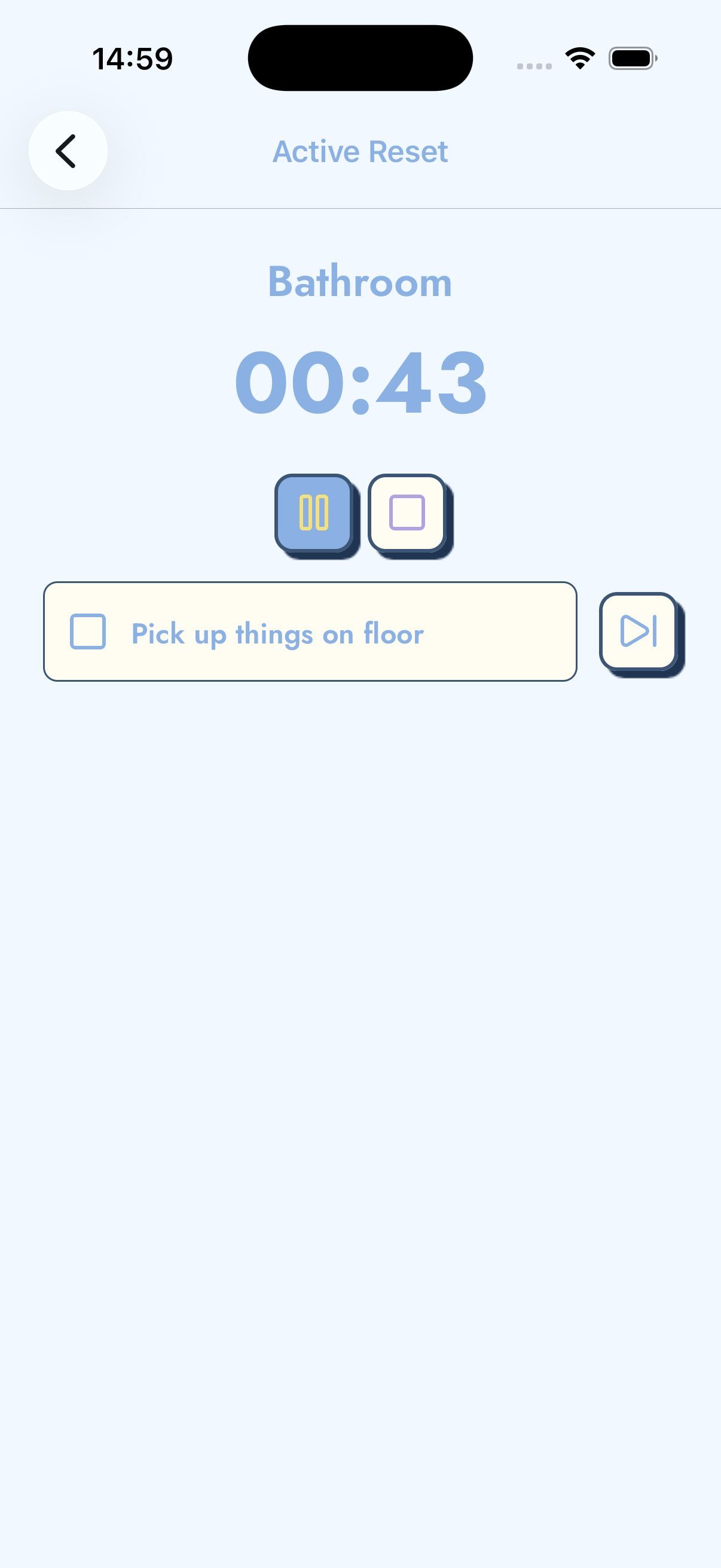
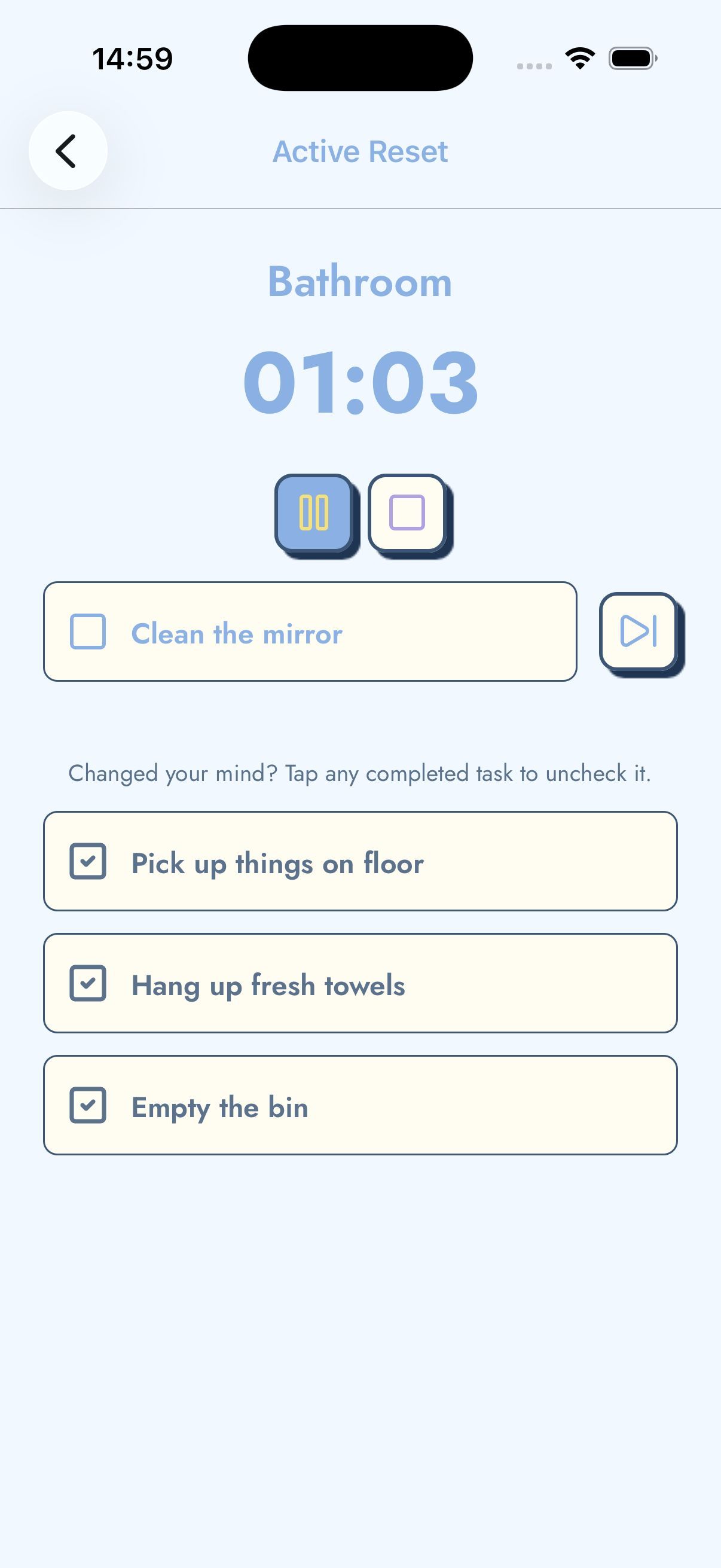
    Each room has a simple cleaning checklist with practical actions such as throw away visible trash, clear one surface, put away five items, wipe the sink, or collect dishes. You can check items in any order, skip anything that does not fit, and edit rooms so the list matches your actual home.

  3. 3

    Complete a timed reset

    Start the reset timer and work only for the time and energy you have. A two-minute tidy, a five-minute room reset, and a longer decluttering session can all count as progress. The timer gives the session a beginning and an end, which helps reduce avoidance and makes cleaning feel less endless.

  4. 4

    Celebrate progress

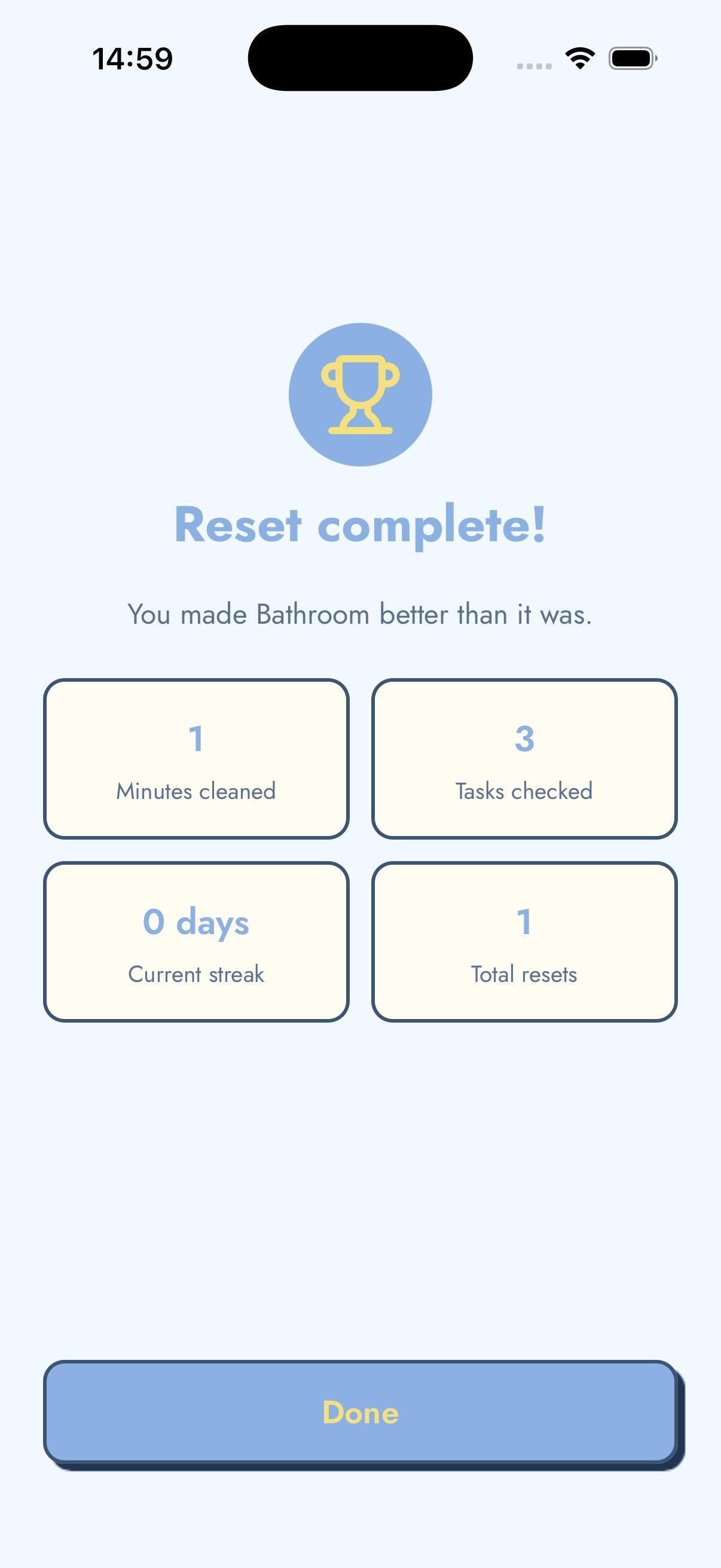
    When the reset ends, TickTidy shows what you completed: minutes cleaned, tasks checked, streak status, and total resets. The completion screen is deliberately encouraging. It reinforces that you made the room better than it was, even if the room is not perfect yet.

Everything you need, nothing you don't

Simple tools that support a light cleaning habit.

Timed room resets

TickTidy turns cleaning into a short reset instead of an open-ended chore. Pick a room, start the timer, and focus only on the next few minutes. A timed reset is useful when executive dysfunction makes starting hard because the commitment is small and specific. You do not need to decide how to clean the whole home. You only need to begin one room reset, stop when the timer is done, and keep the small win.

Room cleaning checklists

Every built-in room includes a practical cleaning checklist designed for visible progress: collect trash, move dishes, clear one surface, wipe what is easy to wipe, and put away a few items. The checklists are not meant to be perfect housekeeping plans. They are prompts that reduce decision fatigue and help you keep moving when you feel stuck, distracted, or unsure where to start.

Custom rooms and routines

Real homes do not all fit the same template, so TickTidy lets you create custom rooms, choose icons, and edit checklist items. You can make a desk reset for remote work, a dorm room reset for student life, a laundry reset for weekend catch-up, or an “I am overwhelmed” checklist for low-energy days. This keeps the app flexible without becoming a complex chore scheduler.

Gentle daily reminders

Optional reminders can nudge you toward a daily cleaning reset without turning missed days into failure. TickTidy is designed to support habit building with calm copy and local notifications at the time you choose. The reminder is not a demand to clean the whole house. It is a small invitation: one room, one timer, one small win.

Progress tracking without shame

TickTidy tracks streaks, total resets, minutes cleaned, and favourite rooms so you can see that small sessions add up. The stats are intentionally simple. There are no overdue task walls, no complicated productivity dashboard, and no punishment for missing a day. Progress tracking exists to encourage you, not to judge you.

Offline support

TickTidy works without an account because rooms, checklists, reminders, and history are stored on your device. That makes it useful in a dorm, apartment, shared home, or anywhere you want a cleaning timer that opens quickly. You can start a room reset even when internet access is poor, because the core cleaning workflow does not depend on a server.

Privacy-first design

TickTidy is local-first. It does not need your name, email address, household details, or cloud account to help you clean. Your cleaning history is personal and stays on your iPhone. The privacy model matches the product philosophy: cleaning support should feel calm, quick, and safe, not like another system you have to manage.

No account required

Many task apps begin with sign-up, setup, projects, labels, assignments, and calendar decisions. TickTidy begins with a room reset. There is no account gate before the useful part of the app, so you can install it and start cleaning in seconds. This is especially important for people who use the app when they are already overwhelmed.

Who TickTidy is for

TickTidy is for people who want gentle cleaning motivation, practical checklists, and a clear way to start when home organisation feels overwhelming.

ADHD-friendly cleaning

TickTidy is useful for ADHD cleaning because it narrows the task to one room, one timer, and a checklist with concrete next actions. It is not treatment and does not make medical claims; it simply reduces decisions, supports momentum, and helps you stop before cleaning becomes an all-day spiral.

Learn more about ADHD-friendly cleaning

Busy parents

Parents often get interrupted before a full cleaning session is possible. TickTidy supports small resets between school runs, meals, work, and bedtime. A quick kitchen reset or living room reset can make the day feel more manageable without requiring a whole-family chore system.

Learn more about Busy parents

Students and renters

Small spaces can become overwhelming quickly. TickTidy helps students and renters clean one visible zone at a time, such as a desk, bedroom, bathroom, or entryway. The app works well when you need a simple checklist and a timer, not a permanent home maintenance plan.

Professionals and remote workers

A cluttered desk or room can make it harder to focus. TickTidy helps you run a short reset before work, after lunch, or at the end of the day. The timer creates a clean boundary so tidying supports work instead of becoming another procrastination loop.

People struggling with overwhelm

When the mess feels too big, “just clean up” is not a helpful instruction. TickTidy gives you a smaller first move: pick one room, do the next checklist item, and stop when the timer ends. The app is designed around small starts and low-shame progress.

Learn more about People struggling with overwhelm

Daily reset routines

A daily reset is a repeatable habit that makes tomorrow easier. TickTidy helps you build that habit without turning it into a complicated productivity system. One short room reset each day can keep clutter from becoming a weekend-sized problem.

Learn more about Daily reset routines

Frequently asked questions

What is TickTidy?

TickTidy is a gentle cleaning app for people who feel overwhelmed by cleaning and need a small, timed way to start. The app helps you choose one room, follow a short checklist, run a room reset timer, and finish with a small win. It is designed for daily resets, ADHD-friendly cleaning, panic cleaning before guests, and low-energy decluttering. TickTidy is not a full home management system, chore scheduler, or family task assignment app. Its core promise is simpler: open the app, pick a room, start a reset, and make that room better than it was a few minutes ago.

Is TickTidy free?

Yes. TickTidy is free to download and use on iPhone. The free version includes the core cleaning timer, room checklists, custom rooms, reminders, streaks, and local cleaning history. The app may show ads at natural breaks, such as after a completed reset, but it is designed not to interrupt the active timer or stop you from starting a cleaning session. If available, a one-time in-app purchase can remove ads. The goal is to keep the main room reset workflow accessible while preserving a calm, low-pressure experience.

Is TickTidy good for ADHD?

TickTidy can be useful for people who want ADHD-friendly cleaning support because it reduces the number of decisions required to begin. Instead of asking you to plan a whole-home routine, it gives you one room, a timer, and a checklist with concrete actions. That structure can help with task initiation, time blindness, and overwhelm. TickTidy is not a medical treatment, diagnostic tool, or substitute for professional support. It is simply a practical cleaning timer designed to make the first step smaller and the finish line clearer.

Does TickTidy work offline?

Yes. TickTidy is designed to work offline because the core app data is stored locally on your device. Your rooms, checklists, reminder settings, cleaning history, streaks, and stats do not require a cloud account. You can start a room reset, check off tasks, and review progress without an internet connection. Ads and App Store purchase checks may depend on normal platform services, but the cleaning workflow itself does not. This makes TickTidy useful when you want a fast, private cleaning app that does not need setup or sync before you can start.

Can I customise cleaning routines?

Yes. TickTidy lets you customise rooms and cleaning checklists so the app matches your actual home. You can create a custom room, rename it, choose an icon, set a default duration, and add or edit checklist items. That means you can make a desk reset, dorm reset, laundry reset, nursery reset, garage reset, or an “I am overwhelmed” list with only the smallest possible tasks. The customisation is intentionally lightweight: enough to make routines personal, but not so much that setup becomes another chore.

Does TickTidy require an account?

No. TickTidy does not require an account, email address, password, household profile, or cloud login. You can install the app and start a room reset without signing up. This is important because TickTidy is often used in moments when the user already feels overwhelmed and needs help starting, not another form to complete. The no-account design also supports privacy. Your rooms, checklists, reminders, streaks, and cleaning history are stored on your device instead of being attached to an online profile.

How is TickTidy different from normal cleaning checklists?

A static cleaning checklist can tell you what to do, but it often does not help with starting, pacing, or finishing. TickTidy combines room-based checklists with a timer, progress tracking, reminders, and a completion screen. The timer gives your cleaning session a boundary. The checklist reduces decision fatigue. The completion screen reinforces that small progress counts. TickTidy also avoids the pressure of a giant whole-home checklist. It is built around short room resets, so it works better for quick daily cleaning, ADHD cleaning, low-energy days, and pre-guest panic cleaning.

Can families use TickTidy?

Families can use TickTidy as a simple shared idea, but the app is not a family chore assignment system. It does not create household accounts, assign tasks to different people, track who did what, or sync lists across devices. That is intentional. TickTidy is best when one person wants to start a fast room reset without setup. A parent can use it for a quick kitchen reset, a child can follow a short bedroom checklist with supervision, or a household can agree to run one reset together. It stays focused on the timer and checklist rather than household management.

Can I use TickTidy every day?

Yes. TickTidy is designed for light daily cleaning habits. A daily reset can be as small as five minutes in the kitchen, a quick bedroom tidy, a desk reset before work, or an entryway reset before bed. Optional reminders can nudge you at a time that makes sense, while streaks and simple stats show that small sessions add up. The app avoids punishment when you miss a day because real life is not perfectly consistent. You can always start again with one room, one timer, and one small win.

Does TickTidy replace habit trackers?

TickTidy can support a cleaning habit, but it is not a general habit tracker. Habit trackers usually focus on checkmarks, streaks, categories, goals, and repeated tasks across many areas of life. TickTidy focuses only on cleaning one room at a time. That narrow focus makes it faster to use when your goal is not to manage habits, but to make a messy space feel better. If you already use a habit tracker, TickTidy can sit beside it as the practical tool you open when it is time to do the actual room reset.

What rooms are included?

TickTidy includes common room reset ideas such as kitchen, bedroom, bathroom, lounge or living room, desk, entryway, laundry, and an “I am overwhelmed” reset. Each room has checklist items that focus on visible progress rather than perfection. For example, a kitchen reset might include putting dishes in the sink or dishwasher, clearing one counter, wiping one surface, and sweeping visible crumbs. A bedroom reset might include laundry, trash, making the bed, and clearing one surface. You can also create your own rooms for spaces that matter in your home.

What is a room reset?

A room reset is a short cleaning session that makes one room better without trying to deep clean the entire space. The point is to restore basic order: remove visible trash, collect dishes, put away a few items, clear one surface, and wipe or sweep what is obvious. A reset is different from a full cleaning routine because it has a smaller scope and a clearer finish line. TickTidy uses room resets because they are practical for busy days, low-energy moments, ADHD cleaning, and the kind of cleaning you do before guests arrive.

What is a daily reset?

A daily reset is a small repeatable tidy that helps keep your home from drifting into a bigger mess. It might be a five-minute kitchen reset after dinner, a bedroom reset before sleep, or a desk reset at the end of the workday. The daily reset is not about maintaining a perfect home. It is about reducing tomorrow's friction by doing one manageable thing today. TickTidy supports daily resets with room checklists, timers, gentle reminders, and progress tracking that makes repeated small wins visible.

Can TickTidy help with executive dysfunction?

TickTidy can help some people work around executive dysfunction by making cleaning more concrete and less open-ended. The app breaks “clean the house” into a smaller sequence: choose a room, start the timer, follow the next checklist item, and stop when the reset is done. That can reduce task initiation friction and decision overload. TickTidy does not claim to treat executive dysfunction or replace professional support. Its value is practical: it gives you a low-pressure structure for starting when the mess feels too large to approach.

Is TickTidy a chore scheduler?

No. TickTidy is deliberately not a chore scheduler. It does not try to plan every recurring household task, assign work to family members, manage a complex calendar, or warn you about overdue chores. Many people already have enough reminders and obligations. TickTidy focuses on the moment of action: starting a short cleaning reset in one room. If you need a full home maintenance calendar, a chore scheduler may be better. If you need a gentle cleaning timer that helps you start now, TickTidy is the better fit.

Is TickTidy available on Android?

TickTidy is currently an iOS app for iPhone. Android is not available at this time. The website may mention Google Play in future conversion plans, but the current app platform is iOS. If Android support becomes available later, the website and download links should be updated to make that clear. For now, iPhone users can use TickTidy for timed room resets, checklists, reminders, custom rooms, and private on-device cleaning history.

Does TickTidy use AI?

No. TickTidy is not an AI cleaning planner and does not scan your room, generate chores from photos, or send cleaning data to a model. The app uses simple local room templates, editable checklists, timers, reminders, streaks, and stats. This makes the experience predictable, private, and fast. The website is written to be easy for search engines and AI answer engines to understand, but the app itself is not built around AI features. TickTidy's strength is calm structure, not automated decision-making.

Where is my cleaning history stored?

Your cleaning history is stored locally on your device. TickTidy uses that history to show simple progress such as completed resets, minutes cleaned, streaks, and favourite rooms. The app does not require a TickTidy account and does not upload your rooms, checklist items, reminders, or reset history to a TickTidy server. If you reset local data or remove the app, that local history may be cleared. This local-first approach keeps the app private and reduces the setup needed before you can start cleaning.

Can TickTidy help before guests arrive?

Yes. TickTidy works well for pre-guest cleaning because it helps you focus on the room people will actually see first. Instead of trying to deep clean the entire home, you can choose the living room, bathroom, kitchen, or entryway and run a short reset. The checklist prompts high-impact actions such as collecting dishes, clearing surfaces, throwing away visible trash, straightening cushions, and doing a quick toilet or sink check. The timer keeps the session contained so panic cleaning becomes calmer and more practical.

How does TickTidy support privacy?

TickTidy supports privacy by avoiding accounts and keeping core cleaning data on your device. Your rooms, custom checklists, reminders, streaks, and reset history are not uploaded to a TickTidy cloud service. The app may show ads, and ads can involve third-party ad networks processing identifiers according to your consent choices and their policies, but that is separate from uploading your personal cleaning history. The privacy design matches the product: a simple cleaning timer should help you start quickly without asking for more personal information than it needs.

What makes TickTidy different from productivity apps?

General productivity apps are built for projects, deadlines, priorities, labels, collaboration, and long-term task management. TickTidy is built for one specific moment: the moment you need to clean but feel stuck. It removes project setup and focuses on a short room reset with concrete checklist items. That makes it less powerful than a full task manager, but more useful when the task is physical cleaning and the main barrier is starting. TickTidy is a cleaning timer, not a second brain.

Your home doesn't need to be perfect.

It can just be better than it was 10 minutes ago. Start your first reset today.